 Linesmith
Your video, in their language.
Linesmith by AlgoWisp turns speech into subtitles, translates them into 33 languages and dubs the video with an AI voice. It runs on your computer, with your own AI key.
Demo
Pick a language. Hear the difference.
A scene from the short film Cosmos Laundromat, put through Linesmith. Switch the subtitles between six languages, or hear Victor's sales pitch dubbed into five.
Subtitles: Linesmith heard the English on the computer and translated it with Google Gemini. In the editor we only fixed the punctuation of one line and when the first line leaves the screen.
Dubbed voice: Linesmith's output with the Gemini voice Enceladus. The music, the sea and the gulls are the film's own; only Victor's voice was replaced.
Cosmos Laundromat © Blender Foundation | gooseberry.blender.org, licensed under CC BY-SA 3.0. This excerpt and the film at the top, with their subtitles and dubbing, are shared under the same license. Subtitles and dubbing made with Linesmith; the film's music is original.
How it works
Three steps, one window.
No account, no upload page, no minute counter. Linesmith is a desktop app: your videos stay in your folders.
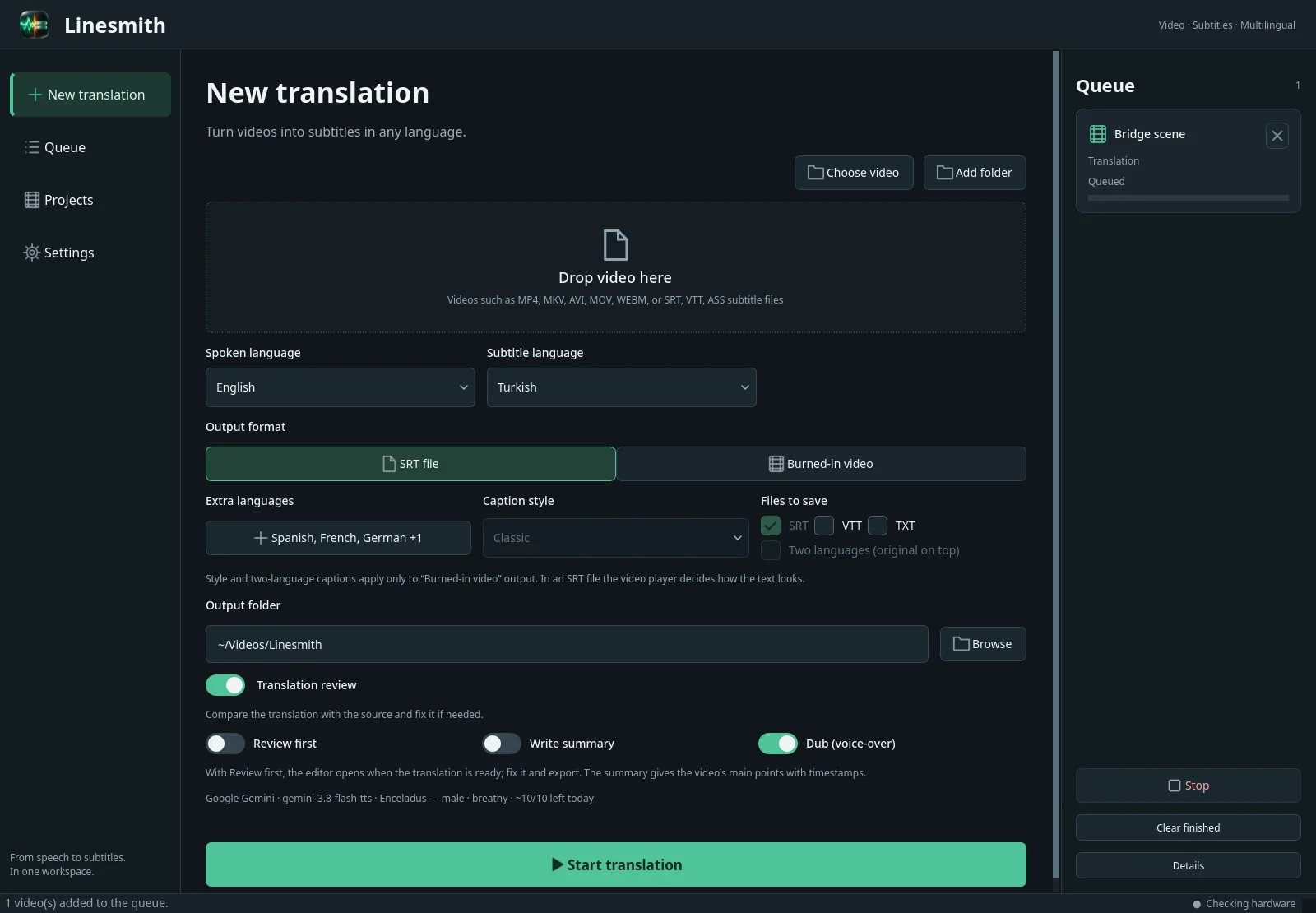
Drop a video, pick the languages
Add files or a whole folder. Choose the subtitle language, add more languages for the same run, and turn on dubbing if you want a voice.
- Speech recognition runs on your computer (Whisper or Parakeet)
- Already have subtitles? Linesmith uses them instead
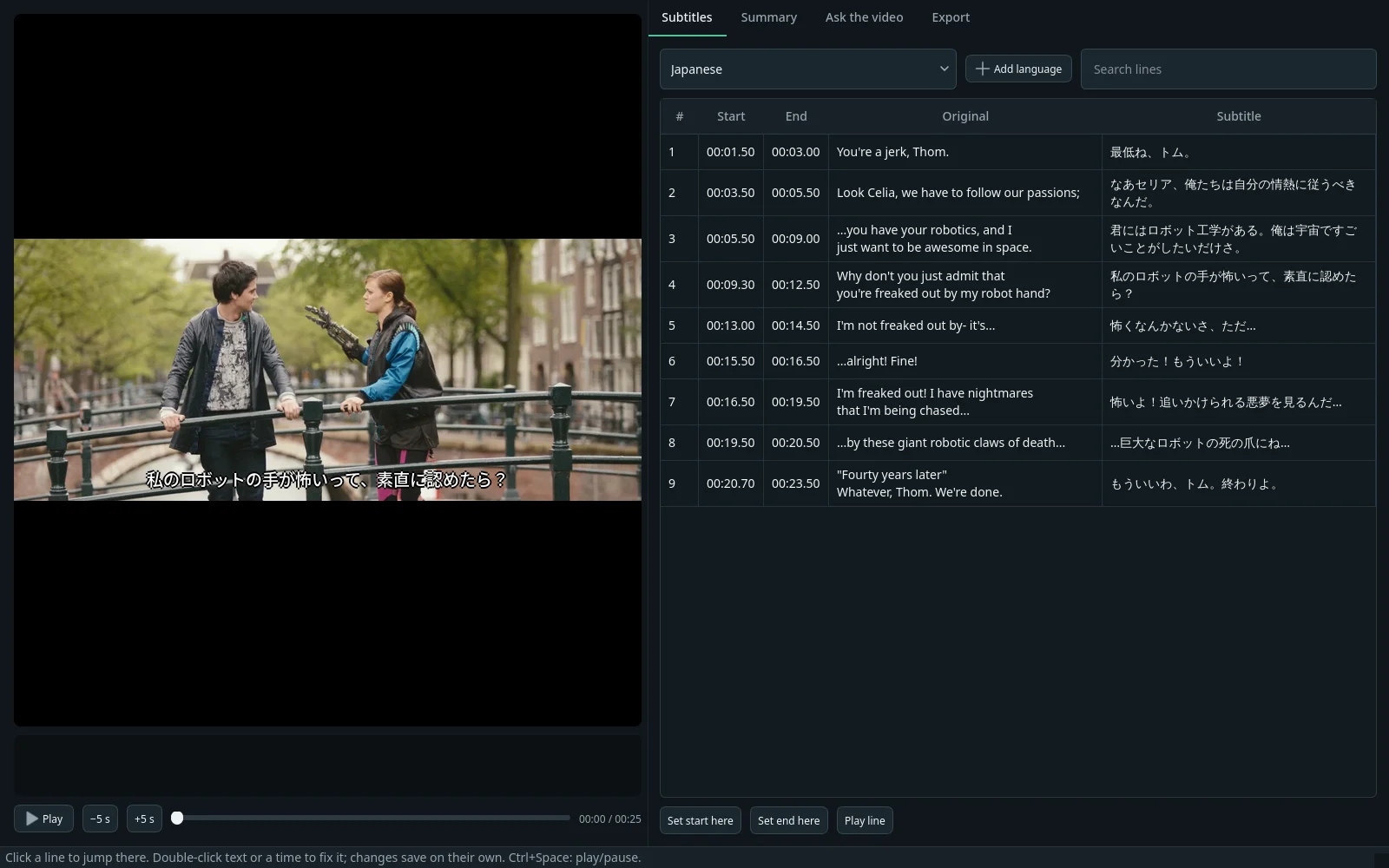
Check every line before it is spoken
Linesmith checks its own translation against the original. Then you can read it next to the source, fix a word or a timing, and play the line in the video.
- Term lists keep names and words consistent
- Summaries and questions about the video, with timestamps
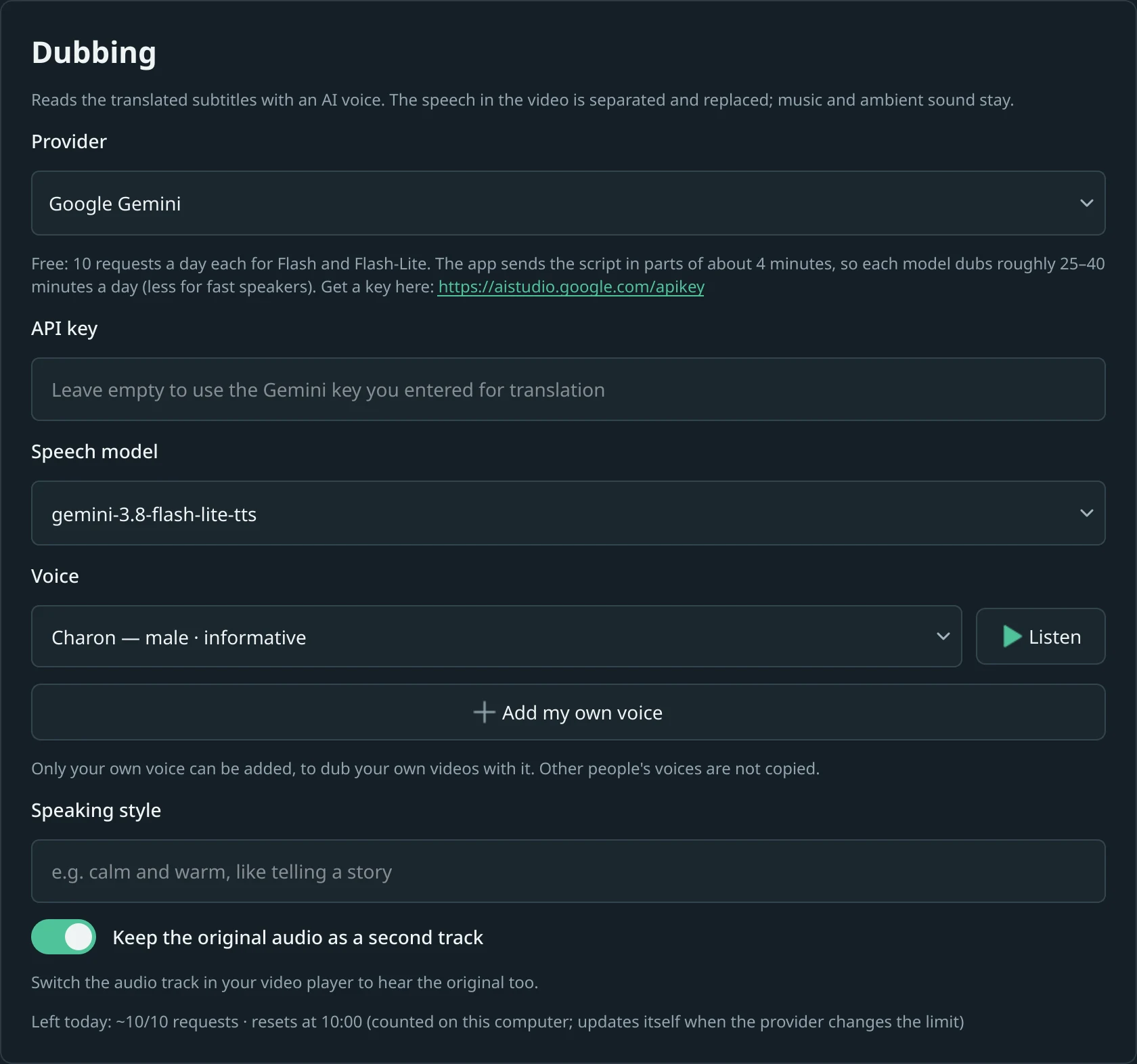
Export subtitles, or a dubbed video
Save SRT, VTT or text, burn the subtitles into the video in three styles, or dub it. Linesmith separates the voice from the music and ambient sound, speaks each line in its time and keeps the original audio as a second track.
- Voices from Google Gemini, ElevenLabs, OpenAI or Azure
- Use your own voice with Gemini or ElevenLabs
Details
Made for people who publish videos.
The parts that usually take an evening: matching subtitles to speech, keeping a translation consistent, exporting again after a fix.
Runs on your computer
Video files are processed locally. Translation sends only the subtitle text to the AI service you chose, or nothing with a local model. Gemini dubbing also sends the original speech, in parts of up to eight minutes.
Your own AI key
Google Gemini, OpenAI, Anthropic Claude, DeepSeek, Mistral, Groq, OpenRouter, or a local model in Ollama or LM Studio. Linesmith shows how many free requests are left today.
Many languages in one run
Translate the same video into several languages at once; each gets its own subtitle file and, if you like, its own dub.
Existing subtitles
An SRT, VTT or ASS file next to the video, or a text track inside an MKV, is used instead of speech recognition.
Projects you can reopen
Every video becomes a project. Fix a line next week and export again without paying for the same translation twice.
Interface in 11 languages
English, Türkçe, Deutsch, Français, Español, Italiano, Português, Русский, 日本語, 한국어 and 中文.
Compare
No minute limits.
Cloud dubbing services sell minutes. Linesmith runs on your computer, so it does not count them; you only pay the AI service you choose for what you use.
| Rask AI Creator | Rask AI Creator Pro | Linesmith | |
|---|---|---|---|
| Price | $39 / month | $99 / month | $19 / monthor $129 / year · $249 once |
| Video minutes | 25 a month | 100 a month | UnlimitedOnly your AI service's own limits apply |
| Runs | In the cloud | In the cloud | On your computer |
| AI service fee | Included in the price | Included in the price | Your own keyGoogle Gemini has a free tier |
| Lip-sync | Not included | Included | Not included |
Rask AI prices with monthly billing and plan features from rask.ai/pricing, checked on 6 October 2026.
Overview
Everything Linesmith does, in two minutes.
From a video you can't follow to one you can: how you start a job, what happens after you press Start, and how the dubbed voice sounds.
Watch on YouTubeThe overview uses the same Cosmos Laundromat scene under the same license. Narration: Google Gemini AI voice. Character art: AI-generated. Music: original.
Pricing
Every feature, in every plan.
Each license works on 2 computers, and you can move it to a new one yourself. Try the first 3 videos free before you buy.
Prices in US dollars; taxes may be added at checkout. Payments are handled by Polar, our merchant of record. Your license key arrives by email and in the Polar customer portal.
Before buying, read the product terms and privacy information (English/Turkish). Manage a purchase or subscription in Polar.
Download
Try it on your own video.
Version 4.7.4. The download is the full app; it asks for a license key after 3 videos. On first start it installs its speech recognition components (a few GB with an NVIDIA graphics card).
Checksums and release notes are on GitHub.
Computer
Windows 10/11 64-bit or a 64-bit Linux desktop. An NVIDIA graphics card is recommended; on Windows, graphics card acceleration is experimental.
AI key
A key from the AI service you choose, for example Google Gemini, which has a free tier. Local models through Ollama or LM Studio also work.
Your files
Video and subtitle files on your computer. Linesmith does not download videos from websites.
FAQ
Questions
Do I need my own AI key?
Yes, for translation and dubbing. Speech recognition runs on your computer without a key. With a key, you pay the AI service directly at their price, or use their free tier where they offer one. Linesmith shows how many requests are left today.
Where do my videos go?
Not to us. Video files are processed on your computer. When you translate, summarise or dub, the subtitle text goes to the AI service you chose. Gemini dubbing also sends the original speech, in parts of up to eight minutes, so the new voice matches how each line was said. If you create your own voice, the recording you choose is uploaded to Gemini or ElevenLabs. With a local model, translation sends nothing.
Can different people get different voices?
Yes. Linesmith finds who speaks each line and gives every person their own voice; with Google Gemini, the voice closest to theirs. If it guesses wrong, change the person or the voice in the editor with one click before you dub.
What happens after the 3 free videos?
Enter a license key in Settings → License. Your projects and settings stay as they are.
Can I use my license on a new computer?
Yes. A license works on 2 computers at a time. Remove it from the old computer in Linesmith or in the Polar customer portal, then activate it on the new one.
Does it work offline?
Speech recognition, editing and exports work offline. The license is checked when you start the app and keeps working for 14 days without internet.
Why does Windows show “Windows protected your PC”?
The current Windows installer is not digitally signed. SmartScreen may warn because Windows does not yet recognize the publisher or download. This warning alone does not tell you whether a file is safe. Read our visual Windows installation guide before continuing, and keep Windows security protections enabled.
I need help
Write to [email protected].
Give your next video a second language.
The first 3 videos are free, with every feature. No account needed.
Privacy
Linesmith has no central user account and no usage analytics. Only the first-run setup window sends anonymous progress signals (app version and setup step, no ID). Speech recognition runs on your computer. Network connections include:
- The AI services you choose receive text and context for translation, summary, chat or dubbing. Gemini dubbing can also send original speech in chunks of up to eight minutes. Creating your own voice sends a voice sample and, for Gemini, a consent recording; the created voice can remain in your provider account.
- Polar receives the licence key, organisation ID, computer name, operating-system information and activation ID for licence activation and checks.
- algowisp.com, to check for and download Linesmith updates. You can turn automatic updates off in the app.
- Component and model downloads, public AI model prices, and the selected provider’s model, voice or account information. Download hosts and providers can receive your IP address and request metadata.
Payments are handled by Polar. This site has no analytics or advertising cookies; hosting and security services can process network/request logs.
Your chosen website language is saved only in this browser.
Full documents: Terms of use · Privacy information · Third-party notices. Available in English and Turkish.